Aggregate POP3 emails into a "secure cloud inbox". Read the same emails on PC or smartphone, anywhere.
※ Gmail's external email import (POP) is no longer available.
※ Android/iOS apps are scheduled to be available by the end of March 2025. Currently, you can use the Web app.

Previously, Gmail allowed you to import other email accounts via POP and manage them in a single inbox.
However, this feature has been discontinued.
→ Now, an alternative is needed.
CloudInbox is a service that securely receives POP3 emails and aggregates them into a cloud-based mailbox.
Consolidate external emails into one inbox
PC, smartphone, and tablet support
※ Android/iOS apps scheduled for end of March 2025
Safe even in the cloud
Set up your mail server information and password.
Automatically fetches emails and saves them to the cloud.
Emails are encrypted and stored securely.
Access the same inbox anytime, anywhere.
In CloudInbox, emails are stored in a cloud-based inbox.
You can view the same inbox anytime.
Since it's not device-dependent, no setup is needed when you replace your PC.
※ Android/iOS apps are scheduled to be available by the end of March 2025. Currently, you can use the Web app.
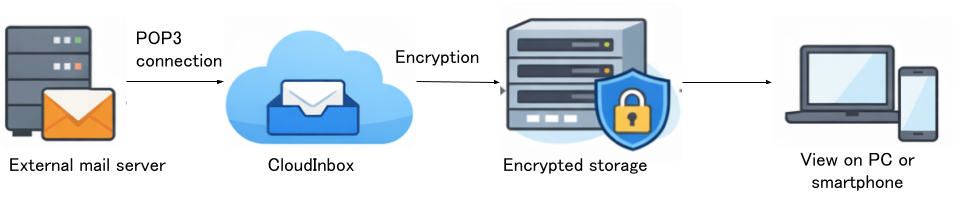
You can aggregate POP3-compatible emails such as custom domain emails, provider emails, and rental server emails into CloudInbox.
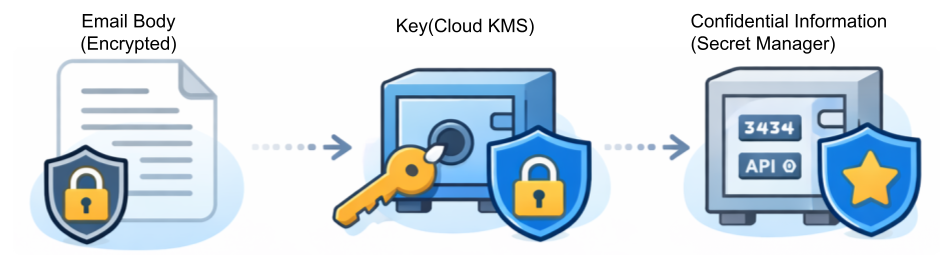
CloudInbox stores email bodies in encrypted form. Third parties cannot read the content.
CloudInbox manages the "keys" that decrypt the encryption using Google Cloud's dedicated services.
Securely store and manage encryption keys
Securely store confidential information such as passwords
Keys and passwords are never stored directly in applications or databases.
| Feature | Gmail | CloudInbox |
|---|---|---|
| External POP Import | ✕ (Discontinued) | ✓ |
| PC Browser | ✓ | ✓ |
| Inbox Consolidation | △ | ✓ |
| Encryption Explanation | Unclear | Clear |
| Key Management | Private | KMS Managed |
You don't have to give up on managing external emails. With CloudInbox, securely and simply.